The addon adds an MCP section under Tools in the Control Panel. It appears for anyone with the Access MCP permission, and it’s off when enabled is false. It opens on a page for choosing Connections or Guidelines. Users who can only open Connections go straight to it.
| Page | Who can open it | What it’s for |
|---|---|---|
| Connections | Anyone with Access MCP | Tokens and OAuth connections |
| Guidelines | Super admins only | What agents are told about the site |
Connections#
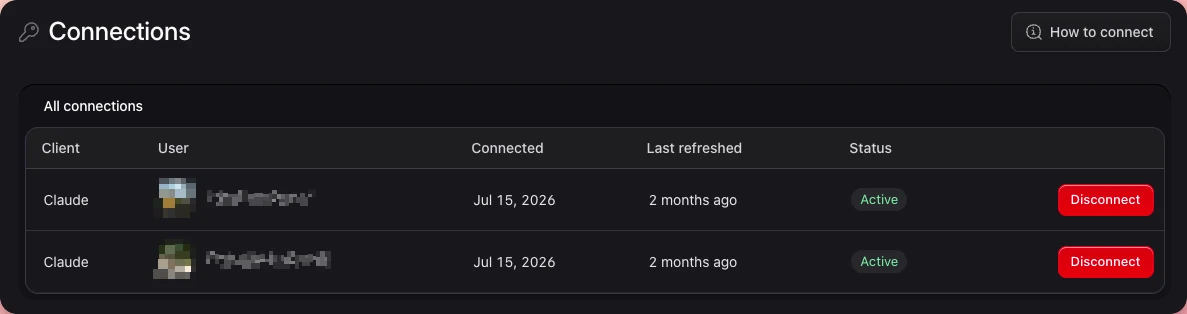
Users see their own tokens and connections. Super admins see everyone’s and can revoke them. The server enforces that too, because hiding a row isn’t the gate. Revoking or disconnecting someone else’s answers 403 for anyone who isn’t a super admin.
In token mode#
The page lists tokens and lets you create new ones. A new token takes an optional label of up to 100 characters and an expiry of never, 30, 90, or 365 days. It’s always issued for the signed-in user, and it’s shown once. One user can hold at most 100 tokens here, because every MCP request parses the whole token file. Issuing a token for someone else stays a console operation, with mcp:token, which has no limit.
If the endpoint isn’t on https, the page warns you.
In OAuth mode#
The token controls are hidden, and the route refuses too, because nothing would accept a token issued there. The page shows one row per connected user and client pair, with the client’s name, the user, when it first connected, its last token refresh, and whether it’s still usable. A live refresh token counts as usable, since the connector can come back without consenting again.
Disconnect revokes the pair’s access tokens and refresh tokens. The connector gets a 401 on its next request and has to go through login and consent again.
Passport doesn’t track per-request usage, so “last refreshed” reflects token issuance, not the last MCP call.
Guidelines#
Holds the site’s voice and tone, which statamic_overview returns, and rows on how a collection’s entries are put together, which blueprints_get returns with the collection’s blueprints.
Only super admins can open it, because what agents read there shapes everything they write. Non-super users don’t see it in the navigation, and the route answers 403. Guidelines for agents covers what to write there.
Languages#
The Tools → MCP pages, the OAuth consent page, and the Access MCP permission follow each user’s Control Panel language. Translations ship for German (de, de_CH), Spanish, French, Italian, Dutch, Norwegian, Portuguese (Brazil), and Russian. Any other language shows English. To change a wording or add a language, put the English text and its translation in your app’s lang/<locale>.json, which takes precedence.
The Access MCP permission#
The addon registers one permission, in an MCP group of the roles UI. It gates both this section and the endpoint.
Super admins already have it. Everyone else needs it on one of their roles, or the endpoint answers 403.