blueprints_get tells an agent which fields a blueprint has. Guidelines tell it how your site uses them: which block opens a page, which never repeats, how formal the copy is. Each rule lives in one place, on the block, field, or section it’s about, or on the Guidelines page for everything wider than a blueprint.
| Where you write it | What it’s for | How agents get it |
|---|---|---|
A field’s instructions | A rule about one field | blueprints_get |
A set’s instructions | When to use a block and what goes in it | blueprints_get |
A section’s or tab’s instructions | A note about one blueprint | blueprints_get, under tabs |
Guidelines page, resources | How a collection’s entries are put together | blueprints_get, under guidelines |
Guidelines page, site | Voice, tone, and rules for every collection | statamic_overview |
Block instructions#
Every set in a Replicator or Bard field already has an instructions key. blueprints_get lists it with the set’s display name and group, so an agent can pick the right block.
page_builder:
  type: replicator
  sets:
    headers:
      display: Headers
      sets:
        hero:
          display: Hero
          instructions: 'First block on landing and service pages, never twice on one page. Follow it with Features or Text.'
          fields:
            -
              handle: heading
              field:
                type: text
                instructions: 'The page promise, under 8 words.'
The agent receives this.
{
  "handle": "page_builder",
  "type": "replicator",
  "required": false,
  "rules": ["array", "nullable"],
  "sets": [
    {
      "handle": "hero",
      "display": "Hero",
      "group": "Headers",
      "instructions": "First block on landing and service pages, never twice on one page. Follow it with Features or Text."
    }
  ]
}
To fill a block, the agent calls blueprints_get again with "set": "hero" and gets the set’s fields and an example row.
{
  "type": "collection",
  "handle": "pages",
  "blueprint": "page",
  "set": {
    "handle": "hero",
    "display": "Hero",
    "group": "Headers",
    "instructions": "First block on landing and service pages, never twice on one page. Follow it with Features or Text.",
    "fields": [
      { "handle": "heading", "type": "text", "required": false, "rules": ["nullable"], "instructions": "The page promise, under 8 words." }
    ]
  },
  "example": { "type": "hero", "heading": "Example text" }
}
Write instructions in the set’s settings in the Control Panel, or in the blueprint or fieldset YAML. Editors see the same text when they add a block, so write it for both: a sentence or two on when to use the block and what goes in it.
A block without instructions still reaches the agent, but only by its name and group until the agent looks it up. The lookup resolves fieldset imports inside the set and lists the sets nested in it by name, which the agent looks up the same way. A set marked hidden comes back with "hidden": true. Agents leave it in existing content and never add a new one.
Tab and section instructions#
A tab and a section of a blueprint take instructions too, like a set. The Control Panel shows them above the fields, and blueprints_get returns the tabs that carry any, with the handles of the fields under them.
tabs:
  main:
    display: Page
    sections:
      -
        display: Basics
        instructions: 'One page per service. Follow web-design: an intro whose bold first sentence states the offer and price, then the blocks.'
        fields:
          -
            handle: title
            field:
              type: text
{
"tabs": [
{
"handle": "main",
"display": "Page",
"fields": ["title", "intro", "page_builder"],
"sections": [
{
"display": "Basics",
"instructions": "One page per service. Follow web-design: an intro whose bold first sentence states the offer and price, then the blocks.",
"fields": ["title", "intro"]
}
]
}
]
}A note about one blueprint goes in its first section: what one entry is, which existing entry to follow, what its page builder usually holds. The Control Panel keeps section instructions when someone saves the blueprint there. A tab’s only survive in a blueprint you edit as YAML.
The Guidelines page#
Anything that isn’t about one field, block, or blueprint goes on Tools → MCP → Guidelines in the Control Panel. Only super admins can open it, because what agents read there shapes everything they write.
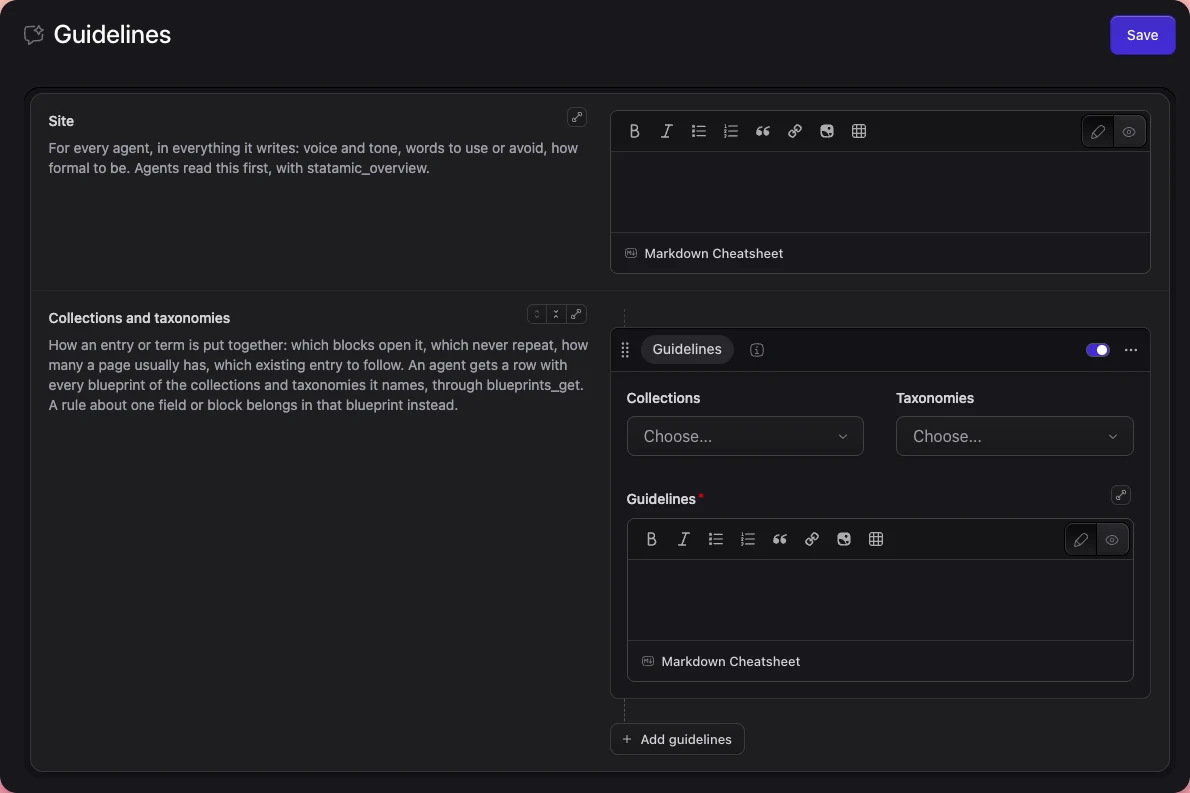
It has two fields.
siteholds voice and tone, words to use or avoid, how formal to be, and rules that hold for every collection.statamic_overviewreturns it, so every agent reads it first.resourcesholds rows that name collections and taxonomies and say how their entries are put together: which blocks come first, which never repeat, how many a page usually has, and page shapes to copy with a named entry for each.blueprints_getreturns the rows naming the requested collection or taxonomy, in their order, with every blueprint of it. A row switched off is left out.
Never restate a field, block, or section there. A rule about one field belongs in that field’s instructions, which agents already get and editors already see, and a copy on the Guidelines page goes stale the first time the blueprint changes.
Agents get the rows for a collection only when they may read that collection’s blueprint, and site goes to every agent. Keep both short, because agents receive them each time they read the overview or a whole blueprint. No tool writes them. Agents read the page, and super admins edit it.
Where it’s stored#
The page saves to Statamic’s addon settings, which is resources/addons/statamic-mcp.yaml, or the database when the site keeps addon settings there. In the file, both fields sit under a guidelines key.
guidelines:
  site: 'Friendly and plain. Never salesy.'
  resources:
    -
      id: t7CijX3yyRNtAzC69ygDW
      type: resource
      enabled: true
      collections:
        - pages
      guidelines: 'Open every page with a Hero block, then one Text block. Follow web-design.'
Statamic runs addon settings through Antlers each time it loads them. The page therefore refuses text that contains {{, an Antlers or Blade component tag such as <s:nav> or <x-card>, or @props, @aware, or @cascade. Describe such a tag in words instead.
Find the blocks without instructions#
php please mcp:guidelinesThe command says where the guidelines are written and lists the blocks that have no instructions. On a site coming from 0.6.0, it moves the old global set first.
  Guidelines for agents, the site's voice and how its entries are put
  together, are written in the Control Panel under Tools → MCP → Guidelines.
  https://example.com/cp/mcp/guidelines

  11 of 14 blocks have instructions. Agents see only the name of the rest
  until they look one up, so add instructions to each set in its blueprint or
  fieldset:

  In collections.landing.landing, collections.pages.page
    page_builder: logo_wall, testimonials

  In collections.pages.page
    page_builder.columns.items: text
A block that several blueprints share through a fieldset is listed once. Hidden sets don’t count.
Coming from 0.6.0#
0.6.0 kept these guidelines in a global set called guidelines. After the update, agents keep reading that set until you move it.
php please mcp:guidelinesThe command copies the set’s values to the Guidelines page, then deletes the set and its blueprint. Run it where the content lives: locally on a flat-file site, then commit the new resources/addons/statamic-mcp.yaml along with the deleted set files, or in production when globals and addon settings live in a database. The command finds the set through the old guidelines key in config/statamic/mcp.php, so delete that key afterwards.
Until you run it, the Guidelines page shows a notice. The command leaves the set in place and says why when:
- The Guidelines page already has guidelines. Agents read the page from then on, so delete the set under Globals once nothing in it is missing.
- The set’s text contains template code that Statamic would run. Describe those tags in words in the set, then run the command again.
- The set’s other sites hold text, which 0.6.0 never read. The command still copies the first site’s guidelines. Copy what you need from the others, then delete the set.
A guidelines set with fields other than site and resources is the site’s own content, and the command never touches it.
Coming from 0.5.0, paste resources/mcp/guidelines/site.md into the Site field and each collection file into a row naming its collection, then delete resources/mcp/guidelines.